Explore the Twilight Dimension

Twilight Forest

Explore the mysterious Twilight Forest Minecraft dimension

Twilight Forest is a long-running Minecraft adventure mod that adds an entire dimension of dim, ancient woodland to the game. This site is an independent guide to that world: how the dimension is reached, what its biomes and structures hold, which bosses shape progression, and how to install the mod without breaking a working setup. You will find plain-language explanations of the portal, the exploration loop, boss encounters, compatibility notes and fixes for the problems players hit most often — written for beginners opening their first portal and for returning explorers checking what changed between releases.

Boss encounters

Named bosses guard their own structures and shape how far you can travel.

Built for exploring

Forests, swamps, highlands and glaciers, each with their own landmarks.

Explore the Dimension

Discover the mysterious Twilight Forest world, its environments, structures and adventure areas.

Discover Biomes

Learn about the different environments and unique locations found throughout the Twilight Forest.

Face Powerful Bosses

Understand the major encounters, progression and challenges associated with the dimension.

Master the Mod

Find installation information, guides, tips, troubleshooting and useful resources.

The basics

What Is Twilight Forest?

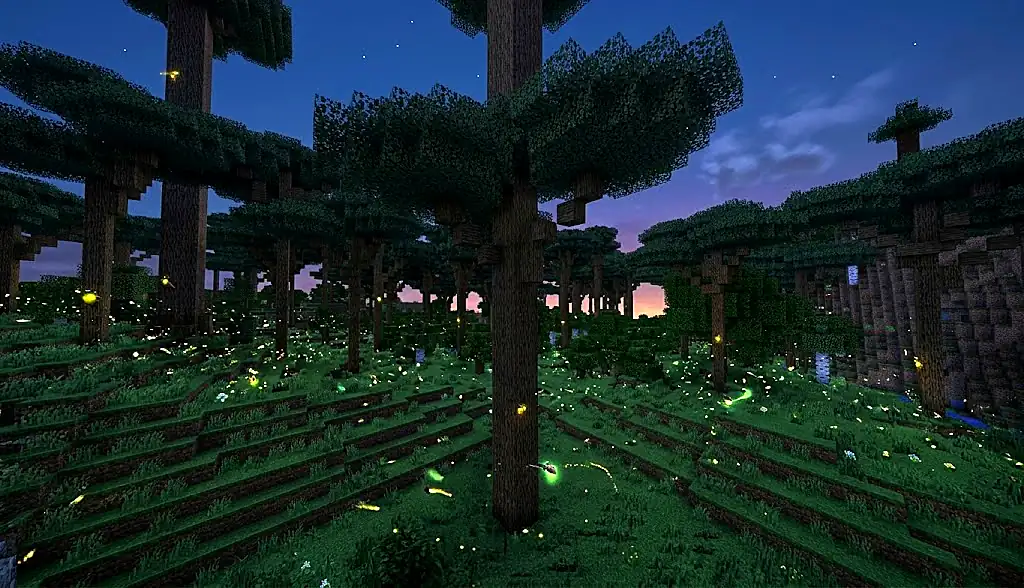
Twilight Forest is a Minecraft mod, originally created by Benimatic, that adds a separate dimension to the game instead of rewriting the world you already play in. That dimension is a vast woodland held in permanent twilight: the sun never really rises, the canopy is thick enough to keep the ground dim, and the whole place is built around walking into the unknown and finding something built by someone else.

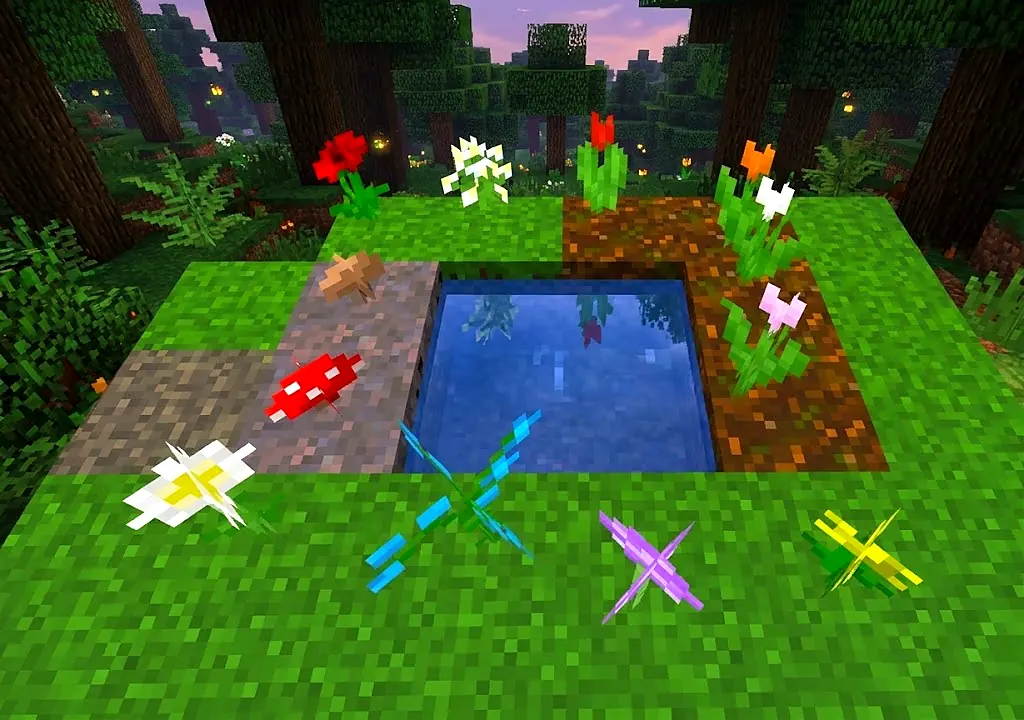
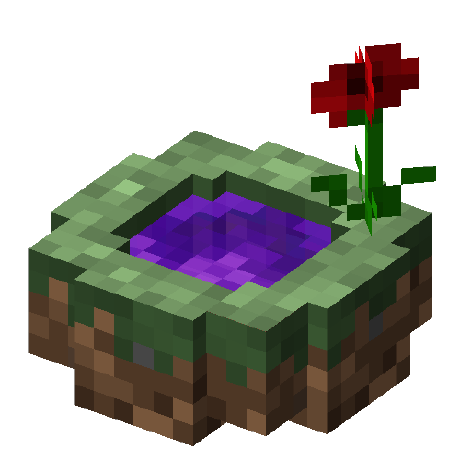
You reach it through a portal you make yourself rather than through a crafted frame. The usual method is a small pool of water surrounded by natural plants — flowers, saplings, mushrooms and similar — with a diamond thrown in to trigger it. The exact ingredients and the way the portal behaves can differ between mod versions, so it is always worth checking the notes for the release you are running.

Once you are through, the dimension is laid out like an adventure map rather than a survival world. Distinct biomes sit next to each other — dense forest, swampland, dark forest, snowy highlands, mushroom groves — and each one tends to hold its own landmarks. Hollow hills hide caves full of ore and mobs. Courtyards, mazes, towers and castles generate as fixed structures with their own layouts, loot and inhabitants.

Progression is the part that makes Twilight Forest feel different from ordinary exploration. In modern versions the dimension is gated: certain areas discourage or block you until you have beaten the boss that comes before them, so the mod reads as an ordered chain of encounters rather than a free-for-all. Defeating a boss usually yields materials and equipment that make the next stage realistic to attempt.

Players explore it for the same reason they explore any good adventure map: the world rewards curiosity. There is always another structure on the horizon, another creature you have not fought, and another piece of gear that changes how you travel. This site collects that information in one place — it is an independent guide and is not affiliated with, owned by or endorsed by the mod’s authors.

Twilight Forest Adventure
ExploreDiscoverBattleProgress
Explore
Discover
Battle
Progress

Four things you will keep doing in the Twilight Forest: walk into somewhere new, find what generated there, survive what lives in it, and come out better equipped than you went in.

What the mod adds

Twilight Forest Features

Eight things the Twilight Forest mod brings to Minecraft, described without version-specific promises. Details vary between releases — always check the notes for the build you install.

New Dimension

A separate fantasy dimension reached through a player-made portal, designed around exploration rather than resource grinding. The sky stays dim, the forest stays dense, and the whole space is laid out so that travelling in any direction eventually turns up something built.

Unique Biomes

Distinct forest environments sit alongside swamps, highlands, snowy regions and mushroom groves. Each biome has its own palette, plant life and residents, and several are tied to a specific stage of progression, so the terrain itself signals how far along you are.

Structures

Courtyards, mazes, towers, strongholds and castles generate with fixed layouts, their own building blocks and their own loot. Hollow hills hide underground chambers. Which structures appear, and what they contain, depends on the version of the mod you are running.

Boss Encounters

Named bosses hold their own arenas and each demands a different approach rather than the same fight with more health. Beating one usually unlocks the materials and the access you need for the next, which is what turns exploration into a progression chain.

Adventure Progression

Modern releases gate parts of the dimension behind boss defeats, so the map opens in a deliberate order. That structure gives the mod a campaign-like shape: prepare, clear the encounter, collect what it drops, and use it to reach the next region safely.

Creatures & Mobs

The dimension has its own wildlife and its own threats, from harmless forest animals and fireflies to goblins, spiders, wraiths, minotaurs and yetis. Many mobs are tied to a particular biome or structure, so where you are usually tells you what to expect.

Treasure & Loot

Chests, hollow hills and boss drops supply materials and equipment that mostly exist inside the mod's own progression. Gear earned from one encounter tends to be the practical answer to the next, so loot is worth collecting rather than leaving behind.

Exploration

Above everything else, the mod is about travelling. Landmarks are visible from a distance, biomes change character quickly, and the reward for walking further is nearly always another structure, another encounter or another region you have not seen yet, usually within sight of wherever you happen to be standing.

Where you will end up

Twilight Forest Biomes

The dimension is divided into recognisable regions, and the terrain is a reasonable guide to difficulty. Biome names, generation and availability depend on the Twilight Forest version in use, so treat the list below as an overview rather than a complete index for one specific release.

Twilight Forest

The dimension's signature landscape and usually the first thing you see: dense, shadowed woodland under a permanently dim sky, dotted with hollow hills and small landmarks. It is the safest place to get your bearings before heading somewhere with a name attached to it.

Dense Forest

Thicker canopy, less light, tighter travel.

Twilight Swamp

Wet, murky lowland with its own residents.

Fire Swamp

A hostile variant of the swamp built around fire and hazards. Areas like this are typically meant for players who have already made progress rather than first-time visitors.

Dark Forest

Gloomier woodland associated with tougher mobs and with structures tied to the mod's later encounters. Expect the ambience — and the danger — to change noticeably as you cross into it.

Enchanted Forest

Brighter, more colourful woodland that reads as magical rather than threatening. Exact generation and contents differ between mod versions.

Snowy Regions & Glacier

Cold biomes in the higher and more remote parts of the map, including snowy forest and icy terrain. These regions are strongly associated with the mod's late-stage encounters, so they tend to be somewhere you arrive at rather than somewhere you start.

Mushroom Forest

Oversized fungi and unusual terrain shapes.

Highlands

Raised, exposed terrain near the map's edges.

The progression chain

Twilight Forest Bosses

Bosses are the backbone of Twilight Forest. Each one holds a structure, each fight asks for a different approach, and in modern versions clearing one is what opens the region after it. Availability, ordering and mechanics change between mod versions — the numbering below reflects the commonly documented chain, not a guarantee for every release.

01 · Naga

Naga Courtyard — a walled arena in the forest. Widely treated as the first boss of the chain, and its drops feed directly into early Twilight Forest equipment.

02 · Twilight Lich

Lich Tower — a tall structure with a fight at the top. Usually the second encounter, and a common requirement before deeper regions stop pushing you back.

03 · Minoshroom

Labyrinth — found beneath the maze structure. An underground encounter that sits in the middle of the progression chain in most modern versions.

04 · Hydra

Hydra Lair — a multi-headed fight in its own cave arena, and a noticeable difficulty step up. Its drops are tied to some of the mod's stronger crafting recipes.

05 · Knight Phantoms

Goblin Knight Stronghold — armoured phantom knights fought in waves rather than as a single body, inside a fortified underground structure.

06 · Ur-Ghast

Dark Tower — a large ghast-like boss at the top of a tower in the darker regions. Typically a late-chain encounter with its own preparation requirements.

07 · Alpha Yeti

Yeti Cave — a snowbound fight in the icy highlands, and the usual gateway to the coldest part of the dimension.

08 · Snow Queen

Aurora Palace — an ice-palace encounter treated as the end of the standard progression chain in the versions where it is implemented.

How a run actually goes

How Twilight Forest Progression Works

Four stages describe almost every Twilight Forest playthrough. How strictly the dimension enforces the order depends on the version you are running.

01

Enter

Build the portal in the overworld — commonly a small water pool ringed with natural plants, activated with a diamond — and step through once it opens. Check your version’s notes, because the exact recipe has changed over the mod’s history.

02

Explore

Get your bearings in the starting woodland. Hollow hills, small landmarks and the first named structures are usually close by, and early exploration is where you gather the materials for everything that follows.

03

Battle

Take on the encounters in order. Each boss sits inside its own structure, drops materials you cannot get elsewhere, and in gated versions is what stops the next region from turning you away at the border.

04

Advance

Craft with what you won, then push into harder terrain — darker forest, higher ground, colder regions. The loop repeats with tougher opposition and better rewards until you reach the end of the chain your version implements.

Inside the dimension

Explore the Twilight Forest Dimension

The Twilight Forest is not a re-skin of the overworld. Light behaves differently, the canopy closes overhead, and the horizon is broken up by structures that were clearly placed rather than generated by accident. That atmosphere is the point: the dimension is designed to be walked through slowly.

Terrain changes character quickly. You can leave ordinary woodland, cross into swamp, and climb into snow-covered highlands without travelling anything like the distance the overworld would demand. Each region brings its own mobs, its own structures and its own reasons to be careful.

Landmarks everywhere

Hills, courtyards, mazes and towers give you something to aim for on every trip.

Encounters with rules

Bosses ask for preparation and a plan, not just better armour.

The honest case

Why Explore Twilight Forest?

Twilight Forest has stayed popular for over a decade for reasons that are easy to state plainly. No download counts, no scores — just what the mod actually offers a player who installs it.

  • A genuinely new place to explore. The dimension is large, hand-designed in feel and separate from your main world, so exploring it costs you nothing back home.
  • Structures worth finding. Courtyards, mazes, towers and castles generate with fixed layouts and their own loot, which makes travel feel purposeful.
  • Boss fights with distinct mechanics. Each encounter asks a different question. Learning one does not automatically win you the next.
  • Progression that has a shape. Clearing an encounter opens the region after it, so the dimension unfolds in an order rather than all at once.
  • Environments you cannot get in vanilla. Fire swamps, dark forests, mushroom groves and glacial highlands all sit within a short walk of each other.
  • Loot tied to the mod's own systems. Materials from encounters feed recipes that matter for the encounters after them.
Before you commit

A quick, realistic checklist for anyone deciding whether to add Twilight Forest to a setup.

Worth knowing: the mod is exploration-led. If you were hoping for automation or tech content, Twilight Forest is not the mod that provides it.
Step by step

How to Install Twilight Forest

The order below works for almost every version of the mod. The details — which loader, which dependencies, which Minecraft build — come from the release you choose, not from a universal recipe.

Always verify the Minecraft version, mod-loader version, dependencies and Twilight Forest release before installation. Mismatched files are the single most common cause of crashes and of mods that never appear in-game. Back up any world you care about first.
01

Check your Minecraft version

Twilight Forest is built separately for each Minecraft version, and a file made for one will not load on another. Decide which Minecraft version you are playing first, then look for a Twilight Forest release that lists that exact version.

02

Check the mod loader

Releases target a specific loader. Historically that meant Forge; more recent builds are commonly published for NeoForge, and Fabric builds have also been made available for some versions. Install the loader the release you chose actually asks for.

03

Check dependencies

Some releases require additional libraries or an API mod alongside the loader, and some do not. The release page lists what is needed. Missing dependencies are one of the most common reasons a mod silently fails to load.

04

Get the correct mod file

Use reputable, official distribution channels for the mod and match the file to your Minecraft version and loader. Avoid re-uploads and bundled installers. This site does not host or link mod files.

05

Install the mod

Place the .jar file in the mods folder of the profile or instance that uses your chosen loader. If you use a launcher such as a modpack manager, add the file to that specific instance rather than to the default folder.

06

Launch Minecraft

Start the game using the profile or instance that has the loader installed. A vanilla profile will launch normally and load nothing, which is a common source of confusion.

07

Verify the installation

Check the mod list in-game to confirm Twilight Forest is loaded, then test in a new world by building the portal. If the mod list is empty or the game crashes on startup, the logs will usually name the version or dependency mismatch.

Before you download

Twilight Forest Compatibility

Compatibility varies by version. Always check the requirements for the specific release you intend to use.

Minecraft Java Edition

Twilight Forest is a Java Edition mod. Bedrock Edition uses a different platform and does not run Java mods, so add-ons for Bedrock are separate products entirely.

Minecraft versions

Builds exist for a wide range of Minecraft versions across the mod's history, but each build targets specific ones. Check the release listing for the version you intend to play.

Mod loaders

Forge has been the traditional loader; newer releases are commonly published for NeoForge, and Fabric builds exist for some versions. Match the loader to the file you download.

Dependencies

Requirements differ by release. Some need an extra library mod, others need nothing beyond the loader. The release page is the authority here.

Client and server

For multiplayer, both server and client normally need the same mod version and a compatible loader setup. A mismatch usually shows up as a failed connection.

Modpacks and other mods

Twilight Forest is widely used inside packs, but interactions with other mods and with world-generation changes are pack-specific. Test on a copy before adding it to a long-running world.

For new players

How to Play Twilight Forest

Six steps that take you from a clean Minecraft install to standing in front of your first real encounter. Nothing here depends on a particular release.

1

Prepare Minecraft

Pick the Minecraft version you want to play, install the matching mod loader, and make a separate profile or instance for it. Keep your vanilla saves untouched.

2

Confirm the mod is installed

Launch the modded profile and open the mod list. If Twilight Forest is not listed, the file, the loader or a dependency is wrong — fix that before anything else.

3

Enter the Twilight Forest

Build the portal in a safe spot. The usual method is a small water pool ringed with natural plants, activated with a diamond. Expect a flash when it opens.

4

Explore the environment

Mark your portal’s location before wandering. Learn the local mobs, gather what the forest gives you, and note landmarks you can see from a distance.

5

Find structures and encounters

Hollow hills and the first named structures are usually close to where you arrive. Clear the easy ones for materials before approaching anything with a boss in it.

6

Progress through the challenges

Take encounters in order, craft with what they drop, and use the new gear to reach the harder regions. Save and back up before each major fight.

What generates out there

Twilight Forest Dungeons & Structures

Adventure locations

Explore mysterious structures

Structures are what turn the Twilight Forest from a large forest into a place worth mapping. They generate with fixed layouts, their own building materials and their own inhabitants, which means finding one always tells you something about where you are and what you are ready for.

Which structures appear, how they are laid out and what they hold depends on the version of the mod in use — treat the categories here as an orientation, not a checklist for one specific release.

Hollow Hills

Grass-covered domes with hollow interiors, full of ore, mobs and chests. They come in different sizes and are usually the first structure a new arrival explores.

Dungeons

Enclosed layouts with their own mobs and rewards.

Castles

Large late-stage builds in remote regions.

Towers

Tall structures with a fight or a puzzle at the top, and interiors built from their own distinct block sets.

Mazes & Labyrinths

Underground networks that reward mapping and patience, and that hide an encounter somewhere in the middle.

Ruins & Landmarks

Smaller points of interest scattered through the biomes — useful as navigation aids as much as for what they contain.

The short version

A World Built for Exploration

Everything in the Twilight Forest points outward. The terrain gives you landmarks, the structures give you destinations, and the encounters give you a reason to keep going once the novelty of the first forest wears off.

Forest Adventures

Travel is the core loop — and the canopy hides more than it shows.

Boss Battles

Set-piece encounters with their own arenas and their own rules.

Mysterious Structures

Built spaces that reward mapping, patience and a spare torch.

Fantasy Landscapes

Swamp, glacier, dark forest and highland, all within reach.

Side by side

Twilight Forest vs Standard Minecraft Exploration

A factual comparison of what changes when the mod is installed. Neither column is better — they are different kinds of play.

FeatureTwilight ForestStandard Minecraft
Dedicated fantasy dimensionYes, as provided by the modNo equivalent Twilight Forest dimension
New structuresMod-specific structures such as courtyards, mazes and towersVanilla structures only
Boss encountersMod-specific encounters tied to progressionVanilla boss content
New exploration areasMod-specific environments and biomesVanilla world generation
Mobs and creaturesAdditional mobs unique to the dimensionVanilla mobs
Progression gatingEncounters can gate access in modern versionsNo comparable gating system
Installation requiredYes — mod loader, correct file and any dependenciesNo
Version sensitivityContent and requirements vary by releaseConsistent within a Minecraft version
Balanced view

Highlights & Things to Consider

Twilight Forest Highlights

  • A large amount of extra exploration. An entire dimension of new terrain to travel, separate from your main world.
  • A strong fantasy atmosphere. Permanent twilight, dense canopy and hand-designed landmarks give the dimension a consistent mood.
  • Boss encounters with real mechanics. Fights are set pieces with their own arenas and their own answers, not reskinned mobs.
  • Structures worth searching. Hollow hills, mazes, towers and castles generate with fixed layouts and their own loot.
  • Progression with a clear shape. Encounters open regions, so the dimension unfolds in an order you can plan around.
  • Widely used and long-supported. The mod has been maintained for over a decade and appears in many established modpacks.

Things to Consider

  • Version compatibility matters. A file built for one Minecraft version will not load on another. Check before you download.
  • Mod-loader requirements differ. Forge, NeoForge and Fabric builds have all existed at various points. Match the loader to the release.
  • Some releases need dependencies. An extra library mod may be required. The release notes are the only reliable source.
  • Different gameplay expectations. This is an exploration and combat mod. It adds no automation, machines or tech progression.
  • Installation is a prerequisite. You need a modded profile or instance; the mod will not appear on a vanilla launch.
  • Mechanics change between versions. Portal recipes, gating, bosses and structures have all changed over the mod's history.
When something goes wrong

Common Twilight Forest Problems & Solutions

Most Twilight Forest issues come from a mismatch somewhere in the chain. The cause can differ between setups, so treat each item below as the first place to look rather than a single universal fix.

Twilight Forest does not appear

Confirm the mod file matches both your Minecraft version and your loader, and that you launched the modded profile rather than a vanilla one. Check the in-game mod list first — if it is not there, nothing else will work.

Minecraft crashes after installation

Usually a version, loader or dependency mismatch, or a conflict with another mod. Read the crash report — it normally names the culprit — and try the mod on its own in a clean instance to narrow it down.

The mod does not load at all

Check that the .jar is in the mods folder of the correct instance, that it is not nested inside another folder, and that it was not left as a partial or renamed download. Some launchers keep a separate mods directory per profile.

A feature looks different from a guide

Twilight Forest has changed considerably over its history. Portal recipes, gating, biome generation and boss behaviour have all differed between releases, so a guide written for another version may simply not apply to yours.

Multiplayer problems

Server and client normally need the same mod version and compatible loader setups. Check both sides, then check the server log — connection failures and world-join errors usually point at a specific mismatch.

Missing dependency error

Some releases require a library or API mod. The error message or log line generally names what is missing; install the version of that dependency listed for your release rather than the newest available.

World generation problems

Adding or removing a world-generation mod mid-save can leave gaps or broken chunks. Test in a fresh world to confirm the mod itself is fine, and prefer starting new saves after significant mod changes.

An update broke something

Check whether the new build still targets your Minecraft version and loader, and whether its dependency list changed. Restore your backup, verify compatibility, then update again deliberately rather than in place.

Learned the hard way

Twilight Forest Tips & Best Practices

Six habits that prevent most of the frustration players report — half of them before you even launch the game.

Check compatibility first

Confirm the Minecraft version, loader and dependencies before you download anything. Two minutes here saves an evening of crash reports.

Back up before you change mods

Copy the world folder before adding, updating or removing Twilight Forest. World-generation changes are not always reversible.

Read the release notes

Each release states its requirements and its changes. It is the only source that reflects the exact build you are about to run.

Explore before you rush

Clear hollow hills and smaller landmarks for materials before approaching a boss structure. Progression rewards preparation.

Keep supplies ready

Carry food, blocks, torches and a way home. Marking your portal’s coordinates the moment you arrive is the single most useful habit.

Use reputable sources

Download from official distribution channels only, and treat re-uploads or bundled installers with suspicion.

Everything in one place

Complete Twilight Forest Guide

A single reference covering the whole journey — from choosing a version to updating the mod without losing a world. Version-sensitive details are flagged as such throughout.

What Is Twilight Forest?

A Minecraft Java Edition mod that adds a self-contained fantasy dimension rather than altering the overworld. The forest sits under permanent twilight, generates its own biomes, structures, mobs and bosses, and is built to be explored in roughly the order its encounters allow. It has been maintained for well over a decade and appears in a large number of modpacks.

Getting Started

Decide on a Minecraft version, install the mod loader that your chosen Twilight Forest release names, drop the mod file into that instance’s mods folder, and launch it. Confirm the mod appears in the in-game list before building anything. Starting in a fresh world avoids generation problems in existing saves.

Entering the Dimension

The portal is made rather than crafted: a small pool of water ringed with natural plants, activated by throwing in a diamond. Build it somewhere you can find again and note the coordinates. The exact requirements have shifted across releases, so check what your version expects if nothing happens.

Exploring Biomes

Terrain is your difficulty indicator. Ordinary twilight woodland is where you arrive and where early materials come from; swamp, dark forest, highland and glacial regions escalate from there. Crossing a border usually means new mobs and a new set of structures, so pay attention when the palette changes.

Discovering Structures

Hollow hills are the reliable early source of ore, mobs and chests. Beyond them, courtyards, mazes, towers, strongholds and castles generate with fixed layouts and their own block sets. Clear the small ones first: the materials and the experience both feed directly into the boss encounters.

Facing Bosses

Each encounter has an arena and a specific answer. Prepare before entering — food, blocks, armour and an escape plan — and expect the fight to test something other than raw damage. Drops are usually the practical route to the gear that makes the next encounter reasonable.

Understanding Progression

Modern releases gate regions behind boss defeats, so the dimension opens as a chain rather than all at once. If an area keeps turning you away or punishing you, that is often the mod telling you an earlier encounter is still outstanding rather than a bug.

Compatibility

Compatibility varies by version. Match the Minecraft version, loader and any dependencies to the specific release you download, and remember that servers and clients generally need matching setups. Interactions inside a modpack are pack-specific and worth testing on a copy.

Installation

Verify the version, install the correct loader, check the dependency list, obtain the file from a reputable official channel, place it in the right instance’s mods folder, launch the modded profile and confirm it loaded. Skipping the verification step is what causes most reported failures.

Troubleshooting

Read the crash report or log before changing anything — it usually names the mismatch. Test the mod alone in a clean instance to rule out conflicts, confirm you are launching the right profile, and check that the file is not a partial download sitting in the wrong folder.

Updating the Mod

Back up the world first, then check whether the new build still targets your Minecraft version and loader and whether its dependencies changed. Update in a copied instance where possible, and keep the previous file until you have confirmed the new one behaves in your save.

Version notice: Twilight Forest has changed substantially across its releases. Portal requirements, biome generation, structures, bosses and progression gating are all version-dependent. Always confirm details against the notes for the exact build you are running.
Where to go next

Twilight Forest Download & Resources

Links below are placeholders you can point at your own pages inside Elementor. This site does not host mod files and does not link to unofficial mirrors.

Twilight Forest Resources

Reference material about the mod, its dimension and its systems.

Installation Guide

The seven-step process for getting the mod running correctly.

Version Information

Why versions matter and what to check before downloading.

Gameplay Guide

How to enter, explore and progress through the dimension.

Troubleshooting

First places to look when the mod will not load or the game crashes.

Always verify the Minecraft version, mod-loader requirements, dependencies and source before downloading any mod file. Prefer official distribution channels, and treat re-uploads, shortened links and bundled installers as unsafe.
Questions people actually ask

Twilight Forest Frequently Asked Questions

Twenty-one answers covering the mod, the dimension, installation, compatibility and the problems that come up most often.

What is the Twilight Forest?

It’s a Minecraft mod that adds a self-contained dimension: a dense, perpetually dim forest full of custom biomes, dungeons, bosses, and loot. The mod’s own pitch centers on fully fledged dungeons, varied boss battles with elaborate mechanics, and treasure with unique traits. Think of it as an adventure-map-sized expansion rather than a handful of new items.

It was created by Benimatic (Ben Mazur) and is now maintained by TeamTwilight, a group of community developers. Development is ongoing — builds have continued to ship for current Minecraft versions.

Files exist for a long list of versions going back to 1.5.2, including 1.7.10, 1.12.2, 1.16.5, 1.18.2, 1.19.x, 1.20.x and 1.21.1, across Forge, NeoForge, Fabric and Quilt. Loader support varies by version — modern releases lean on NeoForge, with separate Fabric builds. Check the CurseForge files page for the exact combination you need.

Dig a 2×2 hole, fill it with water, and surround the pool with natural blocks — grass, dirt, and at least one plant such as a flower or mushroom on the edge. Then throw a diamond into the water. Lightning strikes and the portal opens.

The usual causes are an incomplete ring of natural blocks, missing plant life around the rim, the pool not being flat 2×2 source blocks, or a roof/obstruction over the pool. Also confirm you threw the diamond in (Q key) rather than placing it, and check whether your modpack has changed the activation item in the config.

No. The sun sits permanently near the horizon, which is where the dimension gets its name. That means no natural light-based safety window, so lighting your base and paths matters more than in the Overworld.

Step back into the portal you arrived through. You can also build additional portals inside the dimension using the same recipe, which is the practical way to shorten long treks back to a boss arena.

The mod uses a gated progression system. Bosses and certain biomes are protected until you’ve beaten the required earlier boss — attacking too early does nothing, and entering a locked biome inflicts effects like blindness, burning, or crushing slowness. The in-game Advancements screen tracks the whole chain in order.

Broadly: Naga → Twilight Lich → Minoshroom → Hydra → Knight Phantoms → Ur-Ghast → Alpha Yeti → Snow Queen, with the Final Castle beyond that. The Questing Ram is an optional side objective rather than part of the chain.

Iron gear and a shield are a reasonable minimum for the starting biomes and the Naga. The mid-game bosses expect diamond-tier gear or the mod’s own armor sets, and the late-game biomes will kill an underprepared player quickly.

Craft a Magic Map, which reveals biomes and marks major structures with icons. There are also specialized variants — a Maze Map for navigating the Labyrinth and an Ore Map for locating ores underground.

The Naga is the first boss, a large serpent circling a stone courtyard. It charges in straight lines and shatters the courtyard pillars, so the standard tactic is to use those pillars as cover, strike as it passes, and let it exhaust itself. It drops Naga Scales, which craft into an early armor set.

Every boss drops a trophy. They work as decorative wall-mounted heads, and they’re also the key to activating Trophy Pedestals — a mechanic tied to the mod’s endgame structure.

The main progression runs through Naga Scale, Ironwood, Steeleaf, Fiery, Knightmetal, Phantom, Arctic Fur, and Yeti armor. Each is tied to a specific boss or biome, so your gear tends to advance in step with the progression chain rather than through mining alone.

Found in the Goblin Knight Stronghold, it reverses crafting recipes and can repair or re-roll enchantments using experience levels. It’s powerful enough that many modpacks disable or restrict it, so don’t be surprised if it’s missing or nerfed in a pack.

Fireflies are small placeable light sources found in the Firefly Forest. The Moonworm Queen is a late-ish item that fires glowing moonworms onto surfaces, giving you a ranged, ammo-free way to light dark dungeons and cave systems.

The Dark Tower sits at the heart of the Dark Forest and is home to the Ur-Ghast. Its interior is built around Carminite blocks and reactor puzzles — vanishing blocks, ghast traps, and locked vaults — making it more of a puzzle dungeon than a straight combat gauntlet.

Yes. It’s listed as a client-and-server mod, so the same jar goes on both sides. Progression is tracked per player by default, meaning each player generally advances their own boss chain.

In most versions, yes — the mod ships config options covering progression enforcement and related behavior, and modpacks frequently adjust them. Server operators can also grant progression advancements directly if a player gets stuck.

The Forge/NeoForge builds are standalone and need no additional library mods. Fabric builds require the usual Fabric loader and API setup for your version.

Explore Twilight Forest

Discover a mysterious Minecraft dimension filled with exploration, fantasy environments, structures, challenges and unforgettable adventures.

Scroll to Top